Friday, December 13, 2013

Oracle Application Express 4.2.4 now available

As an early Christmas present / late Hanukkah present, Oracle Application Express 4.2.4 is now released and available for download.  If you wish to download the full release of Oracle Application Express 4.2.4, you can get it from the Downloads page on OTN.  If you have Oracle Application Express 4.2, 4.2.1, 4.2.2, or 4.2.3 already installed, then you need to download the APEX 4.2.4 patch set from My Oracle Support.  Look up patch number 17607802.

As is stated in the patch set note that accompanies the Oracle Application Express 4.2.4 patch set:
  • If you have Oracle Application Express release 4.2, 4.2.1, 4.2.2 or 4.2.3 installed, download the Oracle Application Express 4.2.4 patch set from My Oracle Support and apply it.  Remember - patch number 17607802.
  • If you have Oracle Application Express release 4.1.1 or earlier installed (including Oracle HTML DB release 1.5), download and install the entire Oracle Application Express 4.2.4 release from the Oracle Technology Network (OTN).
  • If you do not have Oracle Application Express installed, download and install the entire Oracle Application Express 4.2.4 release from the Oracle Technology Network (OTN).
As usual, there are a large number of issues corrected in the Application Express 4.2.4 patch set.  You can see the full list in the patch set note.

Some changes in the the Oracle Application Express 4.2.4 patch set:
  1. Large number of bug fixes and administrative UI enhancements to almost all of the Packaged Applications.
  2. A new packaged application - Standards Tracker.  This was the idea and creation of David Gale, who used this application to help manage the standards across all of the other packaged applications delivered with Oracle Application Express.
  3. Numerous bug fixes in the underlying Application Express engine.

Friday, November 08, 2013

You don't lack APEX skills.....you lack Oracle skills

For years, I've been fighting the perception by some customers that "APEX is slow".  Back in 2010, I opined about the corporate architect who didn't like Oracle Application Express because it was slow and couldn't scale.  What helped him form his opinion?  They had a business unit that developed a large number of applications, and the applications were slow.  Granted, the applications were developed and deployed in an uncontrolled and unconstrained environment, but that didn't matter to him.  All he (and their CIO) knew was that these were Oracle APEX applications, and they were slow.  Perception is everything.

I had an email exchange with a contact at this same customer this week.  He did mention the lack of "APEX skills" in the organization, but as I candidly told him, the vast majority of their issues were a lack of Oracle skills, not APEX skills.  They had many people, not necessarily proficient in data modeling or SQL performance tuning or Oracle, building applications intended to service thousands of concurrent end users.  As I told him:

I wouldn't focus too much on "APEX skills".  The problems you've had at your company are "Oracle skills".  How to design a data model.  How to write and tune efficient SQL access.  How to be aware of data security aspects.  How to author and maintain secure, efficient PL/SQL.  APEX is simply the veneer over a database application.
Anytime I start a new APEX application, I actually don't touch Oracle Application Express.  I usually start in SQL Developer Data Modeler and start designing the foundation of my application in a logical and efficient data model.  Once I have that perfected, it's usually quite straightforward to build the Web interface in APEX on top of this.

Just today, I received another shining example of this philosophy of "Oracle skills".  One of my favorite customers at a large enterprise in Europe, where they have hundreds of APEX applications deployed across the enterprise, sent me the following:

....we talked a couple of months ago about the weird visibility of APEX performance in companies. Just to give you another example, we also fight against the perception that APEX is slow, because people know that applications were built with APEX, and if the response time is bad, then APEX is slow.  It's that simple.  We had a complaint about a couple of APEX pages.  One page took around 15 seconds to render with a complicated chart, the other page took around 3 minutes to show up.  
The result of the analysis was - guess - bad DB design paired with bad SQL.  They had a history table with 1.5 billion records, bad partitioning and they populated all LOV filters from this table, distinct, order by.  At the end, the fact table was just 7 million records to filter from the LOV filter elements.  We just built up a new table with all distinct values of the dimensions (the data is loaded only once every night) as base table to serve all filter elements.  We dropped the unnecessary indexes and built a reasonable one and.....voila we were down to 2 seconds for the chart and 3 seconds for the page that took 180 seconds before.  
It's very hard to explain that APEX is neither fast nor slow, because it is not doing anything relevant for itself but just query the database with the good or bad SQL that the developers provide against a good or poorly designed Oracle database, which is more or less busy with 50 other projects and data loads.

If you look at the remedy to improve the performance of their application, it was little to zero APEX and almost all Oracle knowledge and skill.  By the way, creating a select list against 1.5 billion rows is going to take an equally long amount of time using .NET, PHP, Java, Jython, Perl, or whatever.

What's the intended takeaway from this blog post?  Understand the architecture of APEX and how it interacts with the database, but also invest in understanding the Oracle database, SQL and database design.

Monday, September 16, 2013

Oracle Application Express 4.2.3 now available

Just in time for Oracle OpenWorld 2013, Oracle Application Express 4.2.3 is now released and available for download.  If you wish to download the full release of Oracle Application Express 4.2.3, you can get it from the Downloads page on OTN.  If you have Oracle Application Express 4.2, 4.2.1 or 4.2.2 already installed, then you need to download the APEX 4.2.3 patch set from My Oracle Support.  Look up patch number 17347169.

As is stated in the patch set note that accompanies the Oracle Application Express 4.2.3 patch set:
  • If you have Oracle Application Express release 4.2, 4.2.1 or 4.2.2 installed, download the Oracle Application Express 4.2.3 patch set from My Oracle Support and apply it.  Remember - patch number 17347169.
  • If you have Oracle Application Express release 4.1.1 or earlier installed (including Oracle HTML DB release 1.5), download and install the entire Oracle Application Express 4.2.3 release from the Oracle Technology Network (OTN).
  • If you do not have Oracle Application Express installed, download and install the entire Oracle Application Express 4.2.3 release from the Oracle Technology Network (OTN).

As usual, there are a large number of issues corrected in the Application Express 4.2.3 patch set.  You can see the full list in the patch set note.

Some changes in the the Oracle Application Express 4.2.3 patch set:
  1. This is the first patch set that can be applied directly to APEX in Oracle Multitenant in Oracle Database 12c.
  2. Two new packaged applications - Data Reporter and Opportunity Tracker
  3. Some new APIs in the APEX_LANG package, to support translation updates outside of the Web interface of Application Express
  4. Bundling of Twitter Bootstrap 3.0 (even though it's not being exploited in a native theme, yet)
  5. Numerous bug fixes

Thursday, August 15, 2013

Faster Rendering of Charts in Oracle Application Express

I was recently helping a customer whom I had met at the ilOUG Tech Days 2013.  This customer had some questions about line charts and how to easily create multi-series charts without having to write a query per series.  This customer was kind enough to create a test case on apex.oracle.com.  When running his test case, I quickly noticed a separate problem with his charts - they were glacially sloooooowww.  While the page itself would render quickly, it would take a significant amount of time to render the chart and it would sometimes even stall the browser.  Not cool.

Nothing looked odd about his queries for the chart series, so I proceeded to manually run the queries in SQL Commands, and that's where the problem became apparent:  he was attempting to render far too much data.  His queries were returning thousands of data points.  Why is that a problem?  Well, you first have to understand how basic chart rendering works in Oracle Application Express:
  1. A page may be rendered with one or more chart regions
  2. For each chart on the page, an AJAX call is made back to the server to fetch the chart definition and data
  3. Using JavaScript API's, the chart is rendered within each region
It was item #2 which was the problem for this customer.  The more data points you have, the longer it takes to transmit this data from the server back to the browser.  And the more data you bring back, the more data the JavaScript APIs must digest - which takes even longer.

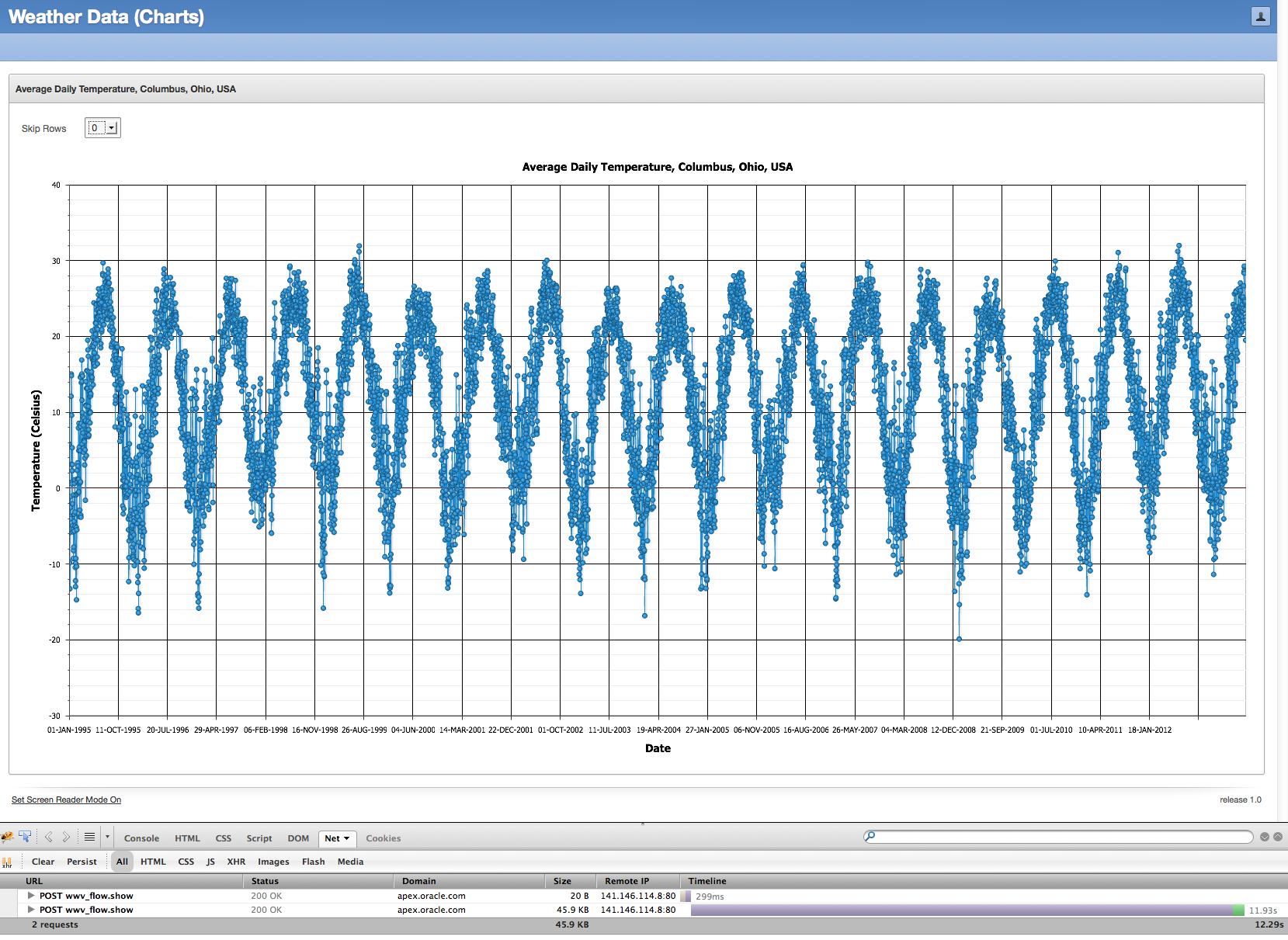
To demonstrate this, I created a sample application using the average daily temperature for my fair city, Columbus, Ohio, USA.  I have a simple table populated with the average daily temperature from 01-JAN-1995 to 27-JUL-2013 - 6,783 rows in all.

I've disabled the option to show all 6,783 data points in a chart - I'll save you from stalling your browser.  But here is a screen shot of the fully plotted data with all 6,783 data points:


As you can see from the Firebug output, it took a long time to load - 11.93 seconds to load 45.9KB of chart data.  And then it probably took another 15 seconds in the browser to parse, digest, and render the corresponding chart.

So how do we improve this situation?  It's simple really - just reduce the amount of data.  As I told this customer, if he reduced the data points by 50% or even 80%, he would still get a fairly equivalent visualization of the same underlying data, but with less data points and faster loading times by the end users.

To achieve this, we can use the MOD (modulus) function in SQL.  The original query I was using in the chart series was:

select null link,
       date_recorded,
       temperature_c,
  from weather_data
 order by date_recorded

To get every other row, I can use the SQL analytic function ROW_NUMBER to get back an ordered set of row numbers, and then use the time-tested trick of the MOD function in the WHERE clause to only include the rows where the result of the modulus function is 0:

with wd as
(select date_recorded,
        temperature_c,
        row_number() over (order by date_recorded) as r
   from weather_data)
select null link,
       date_recorded, 
       temperature_c
  from wd
 where mod(r,2) = 0

And now to make this completely variable, I added a select list item to the page and a dynamic action to refresh the chart when the select list item is changed.  The final query is:

with wd as
(select date_recorded,
        temperature_c,
        row_number() over (order by date_recorded) as r
   from weather_data)
select null link,
       date_recorded, 
       temperature_c
  from wd
 where mod(r,nvl(:P1_SKIP_ROWS,3)) = 0

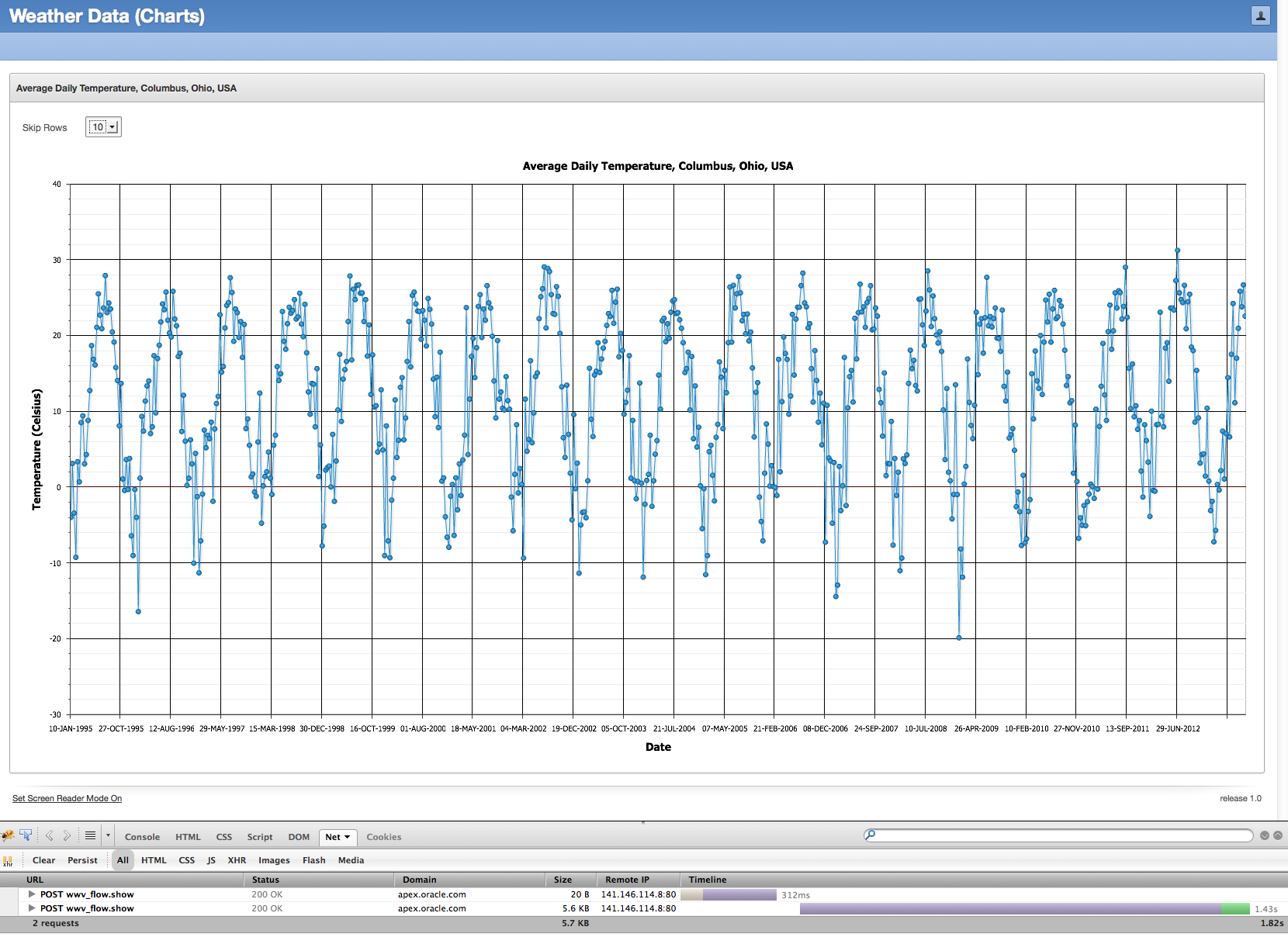
Running this same sample application but now with a divisor of 10 in the modulus function (hence, returning only 1/10th of the data) will give us a chart that looks like:


The basic shape of the chart is the same, just less dense and with less data.  As Firebug showed, 5.6KB of data came back in 1.43s and it took far less time to render in the browser.

This isn't the solution for all problems.  If you need an exact chart, and you're looking for the anomalies in data, then this solution may not work for you.  However, in many cases where charts are used in Web applications, the amount of data used to render the charts can be dramatically reduced without any meaningful loss, and only positive results for your end users.

Feel free to try this yourself in this sample application.


Friday, June 07, 2013

The Winds of Change....for Oracle Application Express 5.0

A few changes are planned for Oracle Application Express 5.0.

Beginning with Oracle Application Express 5.0, the minimum database version for Oracle Application Express will be Oracle Database 11.1.0.7.  Extended Support for Oracle Database 11.1.0.7 ends in August 2015, per the Lifetime Support Policy, and while only roughly 10% of our APEX customers are still using Oracle Database 11.1, this is still considered a supported product for those customers on Extended Support.

Also beginning with Oracle Application Express 5.0, running APEX-built applications using Internet Explorer 6 will no longer be supported.  This was primarily precipitated by the inclusion of jQuery UI 1.10.3 in Oracle Application Express 5.0, but quite honestly, the rest of the world is moving on, and so must Oracle Application Express.

We are also considering dropping support for Internet Explorer 7 to develop applications in the Application Builder, but this is still being evaluated and no final determination has been made.  Feel free to sound off if you believe this would cause you or your customers any significant pain.

Friday, May 24, 2013

Image Prefix changes in Oracle Application Express 4.2.2

Most often, patch sets for Oracle Application Express are used to correct defects (i.e., fix bugs) identified in a release.  It's rare for features to be introduced or behavior to change.  But in the case of Oracle Application Express 4.2.2 and later, there is a change in behavior that is worth discussing, namely, the change in behavior to the Image Prefix application attribute.  This has been raised by Oracle Support three times in the past couple weeks, so we have certainly created some confusion amongst our customers.


In a Nutshell

  • In Application Express 4.2.2, if your image prefix application attribute equals the instance-wide image prefix attribute, it will be set to null in your application.
  • At runtime, if the image prefix application attribute is null, the APEX engine will use the instance-wide image prefix attribute as your application's image prefix.
  • This was done to facilitate ease of movement of applications across varying instances.


Background

Every instance of Oracle Application Express has an instance-wide image prefix.  This image prefix is used by Oracle Application Express to specify the directory location of the Application Express images directory.  This image prefix ultimately correlates to a virtual directory or equivalent on the Web server, and this virtual directory directly maps to the 'images' directory shipped with an APEX distribution and staged on the Web server.  This image prefix is specified at APEX installation time, but it can be adjusted later if necessary.  This image prefix is usually always /i/.

For example, if you go to the Login page of apex.oracle.com and look at the source of that page, you'll see numerous references to images and files of the form /i/...  The HTML for the logo in the upper left is:

<img alt="Application Express" height="20" src="/i/apex_ui/apexlogo.png" width="280" />


There is a virtual directory on the Web server of apex.oracle.com, which maps /i/ to a virtual directory.  This virtual directory maps to a physical directory on the Web server, which contains the entire 'apex/images' directory from the APEX distribution.

The 'apex/images' directory changes from release to release.  The 'apex/images' directory from an APEX 4.1 release is only usable with APEX 4.1.  The 'apex/images' directory fron an APEX 4.2 release is only usable with APEX 4.2.  You can try and use it with APEX 4.1, but you'll definitely see odd results, if anything at all.

The image prefix is also an attribute of the user interface of an application.  This image prefix is used during the runtime of the APEX application, and is used to determine the image prefix for that application.  99% of the time, this image prefix application attribute equals the instance-wide image prefix (typically, /i/), but it could be different too.  It could even be wrong!  If you change your image prefix attribute to '/foobar/' and then run your application, you'll see that all the references to images and static files in the HTML source of your application all reference '/foobar/'.  I suspect you'd get a page with broken images and references everywhere, and in the worst case, you may get what appears to be a blank page.


Using the Image Prefix

Now here's where it gets interesting.  Even though the documentation recommends an image prefix of /i/, it isn't absolutely mandatory.  So let's say that for my APEX 4.1 instance, I use an image prefix of /i_old/, and for my APEX 4.2.2 instance, I use an image prefix of /i_new/.  And also let's assume that these instances use totally distinct Web servers.  If I export an application from my APEX 4.1 instance and import it into my APEX 4.2.2 instance, I will need to update the image prefix application attribute before I can run it in the APEX 4.2.2 instance.  Why is that?  Because my application image prefix is /i_old/, and that isn't defined on the Web server for my APEX 4.2.2 instance.

For those who have participated in the Application Express Early Adopter program before, you'll remember that the image prefix was /i_ea/ or something like that.  When you imported your existing APEX application into the Early Adopter instance, you had to adjust the image prefix of your application to be equal to the instance-wide image prefix, /i_ea/.

For enterprises which host multiple APEX instances via one Web server, they have an equally difficult problem.  They may have image prefixes of /i40/, /i41/, /i42, and wish to freely move and test applications without having to adjust the image prefix attribute every time they import an application.  It's cumbersome and unnecessary.


What has changed in APEX 4.2.2 and Later

Upon upgrade to Application Express 4.2.2 or application of the 4.2.2 patch set, the image prefix attribute of applications will be set to null if their value is equal to the instance-wide image prefix.  In the simplest example, if the instance-wide image prefix is /i/ and your application's image prefix attribute is /i/, the application attribute will be set to null in 4.2.2.

If you try to edit the image prefix application attribute and set it to the instance-wide image prefix (e.g., /i/), it won't be saved and it will be null.  Only if you change it to something other than the instance-wide image prefix will a non-null value be saved.

The utility script to adjust the image prefix instance-wide setting, apex/utilities/reset_image_prefix.sql, now only adjusts the instance setting and nothing more.  No image prefix application attributes are touched.  It's unnecessary, because a null image prefix application attribute means "use the setting of the APEX instance".

Now, if you use a non-standard image prefix for your APEX instance, you can import your application into any other instance without having to be aware of what the image prefix is on the target instance.


Now with that said.....I wish you a nice Memorial Day.

Friday, April 26, 2013

Oracle Application Express 4.2.2 now available


Oracle Application Express 4.2.2 is now released and available for download.  If you wish to download the full release of Oracle Application Express 4.2.2, you can get it from the Downloads page on OTN.  If you have Application Express 4.2 or 4.2.1 already installed, then you need to download the APEX 4.2.2 patch set from My Oracle Support.  Look up patch number 16277995.

As is stated in the patch set note that accompanies the Oracle Application Express 4.2.2 patch set:

  • If you have Oracle Application Express release 4.2 or 4.2.1 installed, download the Oracle Application Express 4.2.2 patch set from My Oracle Support and apply it.  Remember - patch number 16277995.
  • If you have Oracle Application Express release 4.1.1 or earlier installed (including Oracle HTML DB release 1.5), download and install the entire Oracle Application Express 4.2.2 release from the Oracle Technology Network (OTN).
  • If you do not have Oracle Application Express installed, download and install the entire Oracle Application Express 4.2.2 release from the Oracle Technology Network (OTN).

As usual, there are a large number of issues corrected in the Application Express 4.2.2 patch set.  You can see the full list in the patch set note.

Like all patch sets for Oracle Application Express, there are a large number of functional issues corrected in this release.  But also with the APEX 4.2.2 patch set are a large number of updates to the packaged applications - improved user interface, improved layout and functionality, improved accessibility, improved security, and a fair number of functional bugs corrected.  Also in APEX 4.2.2 is a new often-requested application called Survey Builder.  This application was architected by John Snyders, who did a masterful job in its creation.  I truly think Survey Builder has the potential to be a "killer" APEX application.


Tuesday, April 09, 2013

Great Lakes Oracle Conference - May 14/15, 2013

The Great Lakes Oracle Conference will be held on May 14/15, 2013 at the Cleveland State University campus.  Registration includes two full days of training with more than 30 sessions to choose from, vendor exhibits to peruse, lunches, and a networking reception.  And if that weren't enough, there will be keynote presentations from Chris Date and Tom Kyte.

There are actually three pre-conference workshops (at additional nominal cost) on three totally distinct topics - All About Binding from Tom Kyte, Oracle Performance Research Seminar from Craig Shallahamer, and Oracle Application Express - I Never Knew It Was So Easy! from me.  If you've wanted to get your feet wet with Oracle Application Express, this may be the workshop for you - completely hands on - building, tuning, debugging and monitoring APEX applications.  This is geared toward the beginner/intermediate developer - no knowledge of APEX is assumed.

I reviewed the list of presentations and presenters, and I'm convinced this is one of the highest quality events available in the Midwest (U.S.).  The early registration rate for the conference is $250 until April 12.

Friday, March 08, 2013

Invalid database objects on apex.oracle.com?

Most people are aware of apex.oracle.com, the demonstration instance of Oracle Application Express.  It's primarily used for people to "kick the tires" of APEX.  Last week alone, there were 810 new workspaces approved on this instance.

Changes are coming to apex.oracle.com - it's going to be consolidated onto other hardware and also Oracle Database Vault will be installed and implemented.  Part of the process of installing Oracle Database Vault includes running the script $ORACLE_HOME/rdbms/admin/utlrp.sql.  This script will attempt to recompile all invalid objects in the database.

As of today, 08-MAR-2013, there are 62,197 invalid database objects across all of the workspaces on apex.oracle.com - not that bad, considering there are 17,447 APEX workspaces and 17,984 workspace schemas.  However, it takes a long time to attempt to recompile 62,197 invalid database objects.  And this will only serve to dramatically increase the outage time for this instance.

Thus:

  1. A listing of all invalid database objects in the workspace schemas was computed today, 08-MAR-2013.
  2. A second listing of all invalid database objects in the workspace schemas will be computed again on 13-MAR-2013.
  3. All invalid objects contained in both reports will be immediately dropped with no chance of recovery (as the Recycle Bin will be purged).

Update March 12, 2013:  This drop and purge will no longer occur on 13-MAR-2013, nor at any time in the future.  We were able to make significant progress in the reduction in the number of invalid objects (reduced by 85%).  Thus, we're going to live with the additional outage time cause by this recompilation instead of dropping objects in workspace schemas.

Wednesday, January 23, 2013

Dude, Where Are My Buttons?

An interesting bug was reported the other day on the Oracle Technology Network discussion forum for Oracle Application Express.  The scenario is as follows:

1)  Download and install Oracle Application Express 4.2.1 anew.
2)  Install a translated version of Oracle Application Express
3)  Login to a workspace and navigate to SQL Workshop.

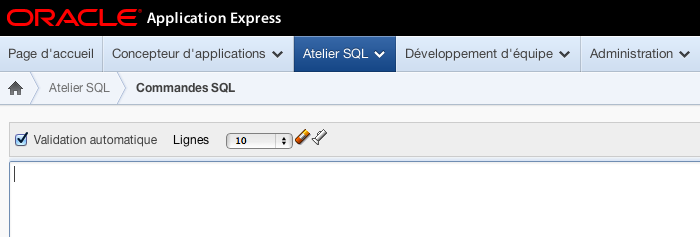
What should look like:


is actually displayed as:


Unfortunately, the buttons of SQL Workshop are not displayed when you install a translated version of Oracle Application Express 4.2.1.  [If you had Oracle Application Express 4.2 installed and downloaded/installed the Oracle Application Express 4.2.1 patch set from My Oracle Support, you would not encounter this issue.]

This problem can be remedied by downloading the patch set exception for Bug 16191354 from My Oracle Support and applying it to your APEX 4.2.1 instance.

Note - if you choose to install additional translated versions, it's safe to re-run the patch 16191354 after you've installed all translations.

Update:  As of January 29, 2013, the APEX 4.2.1 download was updated to correct this problem.  So if you download the apex_4.2.1.zip file (full distribution) after January 29, 2013, you should not encounter this problem and you can safely ignore this blog post.

Friday, December 14, 2012

Oracle Application Express 4.2.1 now available


Oracle Application Express 4.2.1 is now released and available for download.  If you wish to download the full release of Oracle Application Express 4.2.1, you can get it from the Downloads page on OTN.  If you have Application Express 4.2 already installed, then you need to download the APEX 4.2.1 patch set from My Oracle Support.  Look up patch number 14732511.

As is stated in the patch set note that accompanies the Oracle Application Express 4.2.1 patch set:

  • If you have Oracle Application Express release 4.2 installed, download the Oracle Application Express 4.2.1 patch set from My Oracle Support and apply it.  Remember - patch number 14732511.
  • If you have Oracle Application Express release 4.1.1 or earlier installed (including Oracle HTML DB release 1.5), download and install the entire Oracle Application Express 4.2.1 release from the Oracle Technology Network (OTN).
  • If you do not have Oracle Application Express installed, download and install the entire Oracle Application Express 4.2.1 release from the Oracle Technology Network (OTN).

As usual, there are a large number of issues corrected in the Application Express 4.2.1 patch set.  You can see the full list in the patch set note.

P.S.  Don't be alarmed when the patch set note refers to file p14732511_421_GENERIC.zip and the file you actually download from My Oracle Support is p14732511_420_Generic.zip.  These are the same file and this version number will be corrected over the weekend.

Monday, November 05, 2012

APEX 4.2 and Textareas

There is a change in behavior in Oracle Application Express 4.2.0.00.27 that I thought was worth making special mention of.

Most page items have a property named "Maximum Width".  The purpose of this attribute, as the item-level help states, is to "specify the maximum number of character users are allowed to type into this form element."  Thus, if you were to specify a value of 255, then end users theoretically would not be able to enter more than 255 characters for the item value.

Prior to Oracle Application Express 4.2.0.00.27, this attribute for Maximum Width was not emitted in the HTML for Textarea page items.  You could have had a Maximum Width of 255 or 4000 or 32000 - it didn't matter.  The amount of text that could be entered by your users was essentially unconstrained (up to the 32,000 limit that can be POSTed).  In Oracle Application Express 4.2.0.00.27, Textarea page items are now properly including this attribute in the HTML for the page item.

Prior to APEX 4.2.0.00.27, my Textarea named P2_RESUME, with a Maximum Width of 2000, might be rendered like this:


But in APEX 4.2.0.00.27, my Textarea named P2_RESUME, with a Maximum Width of 2000, will now render like this:


A number of internal and external customers have rightfully complained about Oracle Application Express 4.2.0.00.27 breaking functionality in their existing applications.  Previously, end users were able to enter a large amount of text in textareas, but now "APEX limits what can be entered by end users."  And this directly relates to the Maximum Width attribute, which most developers were able to safely ignore for textareas in the past, but in 4.2.0.00.27, it is very relevant.

I can offer the following suggestions and direction:

1) If you wish to query the APEX data dictionary for all items in your application(s) which may be impacted by this change, you can issue the query:

select application_id, page_id, page_name, item_name, item_element_max_length
  from apex_application_page_items
 where display_as_code = 'NATIVE_TEXTAREA'
 order by 1,2,3,4

2)  In the forthcoming Oracle Application Express 4.2.1 patch set, this Maximum Width property of textarea items will only be emitted when the application-level attribute Compatibility Mode is 4.2 or later.  Thus, if you are upgrading from Oracle Application Express 4.1.1 or earlier, the Compatibility Mode will not be set to 4.2 and your application behavior will remain the same.

3)  There is a patch set exception on My Oracle Support, Patch ID 15829665, which implements the above-mentioned "Compatibility Mode" behavior.  You can download this PSE (i.e., "one-off patch") and apply it to Oracle Application Express 4.2.0.00.27 today.

Note that this "maxlength" attribute for textareas is not enforced by Internet Explorer.

Saturday, October 13, 2012

Oracle Application Express 4.2 released


Oracle Application Express 4.2 was officially released today and is available for download from the Oracle Technology Network.

The main goal of Oracle Application Express 4.2 is to enable the easy development of mobile applications, using the same declarative infrastructure and methodology of APEX.  As detailed here, the marquee features of Oracle Application Express 4.2 include:

  • Application Builder for Mobile
  • Both mobile and responsive themes
  • HTML5 Charts
  • HTML5 Item Types
  • Packaged Applications
  • RESTful Web Services
  • and many more...

As we do for every release, we offer our gratitude to the countless people who participated in the Application Express 4.2 Early Adopter program and provided feedback, suggestions and bug reports.

Wednesday, September 12, 2012

Application Express 4.2 Early Adopter instance going away...

It was just 3 short months ago that Application Express 4.2 Early Adopter was made available.  As of September 21, 2012, the Application Express 4.2 Early Adopter site will no longer be available.  The database will be permanently removed.  If you need to export anything, please do it well before September 21, 2012.  There will be no hope of restoration or recovery after this day.

The Application Express demonstration instance at http://apex.oracle.com has been upgraded to a pre-production version of Application Express 4.2.  This effectively replaces the Early Adopter instance.

We have received a tremendous amount of feedback, suggestions and bug reports.  The participation by over two thousand users was the the most we've ever had.  Once again, we are grateful to the APEX community for their interest, participation and support.


Tuesday, August 28, 2012

apex.oracle.com to be upgraded to Oracle Application Express 4.2

On the evening of Saturday, September 1, 2012 at 1800 PDT (0100 UTC), http://apex.oracle.com will be upgraded to a pre-release version of Oracle Application Express 4.2.

I know that apex.oracle.com is used by numerous people to host their sample APEX applications and sample plug-ins.  I simply wanted to give people ample opportunity to export whatever they wished before the upgrade.

After the upgrade, the applications on apex.oracle.com cannot be imported into an APEX 4.1.1 or earlier instance.

For any issues you believe are directly related to the upgrade, please feel free to post on the OTN discussion forum (preferred) or send an email to oracle-application-express_ww@oracle.com.

Monday, August 06, 2012

RESTful Services now available on Oracle Application Express 4.2 Early Adopter


Last week, on August 3, 2012, the Oracle APEX Listener 2.0 Early Adopter was made available for download from OTN.  And also this past weekend, the Oracle Application Express 4.2 Early Adopter 2 site was switched from Oracle HTTP Server/mod_plsql to the Oracle APEX Listener 2.0 Early Adopter (thanks goes to Colm from the APEX Listener team, Hilary from the APEX team, and Wei from PDIT for making this happen).

One area of functionality which is now exposed and available for testing on the Oracle Application Express 4.2 Early Adopter 2 site is RESTful Services.  These can now be easily created and tested within the Oracle Application Express RESTful Services module.

A very rich example of a RESTful Service is created within each workspace.  To test this yourself:

  1. Login to your workspace (register for one, if you havent' done so already)
  2. Click "SQL Workshop"
  3. Click RESTful Services
  4. Click oracle.example.hr
  5. Click the "GET" resource handler under the "empinfo/" resource template, in the hierarchy on the left
  6. Scroll down and click the "Test" button

In my JOEL workspace on the Application Express 4.2 Early Adopter 2 site, with the JOEL path prefix for my workspace, this resulted in a URL like:

https://apexea.oracle.com/pls/apex/joel/hr/empinfo/

[Note - after APEX 4.2 is eventually released and the APEX 4.2 Early Adopter site is extinguished, the above URL will no longer function]


Show your (ā'pěks)

In 2009, I responded in a blog post to the question of how to properly pronounce the abbreviation for Oracle Application Express.  Since then, Chet Justice (*the* oraclenerd) has taken special delight in mispronouncing it to me at every opportunity, at every conference.  But I have to give Chet credit - he has helped the correct pronunciation cause by designing a shirt which will remove all ambiguity and doubt.  Get yours today!


Wednesday, July 25, 2012

ODTUG APEXposed 2012!


Three important questions for you:

  1. Did you want to go to the ODTUG Kscope12 conference but couldn't make it because of "[insert excuse here]"?
  2. Do you have an interest in learning about Oracle Application Express 4.2, APEX Listener 2.0, HTML 5, jQuery, plug-ins and more?
  3. Have you always wanted to visit the beautiful city of Montreal, Quebec, but never had a good reason?

Well...have I got the conference for you!  ODTUG is sponsoring another APEXposed conference.  The next one is scheduled for September 11/12 2012 in Montreal, Quebec.  If you've been around Oracle Application Express for even a short period of time, you'll surely recognize the names of these presenters.  And the content for this conference is very strong (as is the case for all of the ODTUG conferences that I've been to).

I thoroughly enjoy the ODTUG conferences for Oracle Application Express - very little fluff, all worthwhile technical content and education.  Until August 15, 2012, registration is 399 USD.

Monday, July 23, 2012

Application Express 4.2 Early Adopter 2 now available

Oracle Application Express 4.2 Early Adopter 2 is now available at https://apexea.oracle.com.  If you previously participated in Application Express 4.2 Early Adopter 1, you'll need to sign up for a new workspace.

You can get the updated feature list at http://apex.oracle.com/pls/apex/f?p=38997:1:0, but some notable introductions in APEX 4.2 EA2:

  • You can now create multiple user interfaces in the same application
  • You can unlock and download Packaged Applications
  • Team Development now supports file attachments for bugs, features and todo's.
  • You can define a "Global Page" per user interface, instead of relying upon page 0
  • You can "grid edit" the translation repository
  • The User Interface of the Application Express applications has been further improved.  Note - if you used EA1 previously, you may need to clear your browser cache or Shift-Reload on many of the pages in the Application Express applications
  • You can enable cascading LOVs for Select Lists, Checkboxes and Radio groups in mobile user interfaces
  • There are two new application-level Globalization attributes to control character value comparison (for those wishing to do accent-insensitive searching).  For now, this applies only to classic reports and Interactive Reports.
  • Existing item types were modified so they work with jQuery Mobile when used with dynamic actions
  • And many more....

The response for Oracle Application Express 4.2 Early Adopter 1 was overwhelming.  We are completely appreciative of the time and effort spent by over 1,000 people, helping to improve this release of Oracle Application Express.  You'll see that a large number of the great suggestions from the APEX community have been added to Application Express 4.2 Early Adopter 2.  Thank you for all of your invaluable feedback.

Tuesday, July 17, 2012

Partners Being Contacted


A number of partners have been receiving letters from a company named Advanced Dynamic Interfaces LLC.  Although Advanced Dynamic Interfaces LLC has not contacted Oracle, we are aware of, and are currently investigating, this matter.   Letters received from ADI can be forwarded to the following address:

Oracle Legal Department
Patent, Trademark & Copyright Group
500 Oracle Parkway, M/S 5OP7
Redwood Shores, CA 94065