Just in time for the ever-awesome ODTUG KScope 14 conference...we are happy to announce the availability of Oracle Application Express 5.0 Early Adopter 2. The response from Early Adopter 1 was overwhelming (with over 4,000 participants), and we look forward to the same great contributions from the APEX community for Early Adopter 2. You can access the Early Adopter 2 at https://apexea.oracle.com.
As before, the authentication for Oracle Application Express requires an Oracle account. This is the same account you would use for many Oracle sites, including the OTN Community discussion forums. If you don't have an account, then simply follow the instructions on the login page to "Sign up for a free Oracle Web account". However, ensure that you specify the same email address as your Oracle Web account when requesting a new workspace.
The Known Issues will be populated soon, as well the application to review your submitted feedback. Our team has made tremendous strides since Early Adopter 1, and we continue to believe that APEX 5.0 will become a watershed release for APEX and the community.
Thank you for all of your support.

Turning customers into rockstars, with Oracle Database, SQL and Oracle APEX.
Wednesday, June 18, 2014

Wednesday, June 11, 2014
Oracle Application Express 5.0 Early Adopter 2 is on the Horizon

Oracle Application Express 5.0 Early Adopter 2 is on the horizon. This also means that the current instance of Oracle Application Express 5.0 Early Adopter 1 (https://apexea.oracle.com) is going away soon. This involves deleting the current database and creating one anew. Nothing will be migrated or saved. To try out Early Adopter 2, you will need to sign up for a new workspace. So if you have anything in your workspace in Early Adopter 1 that you would like to save, now is the time to copy it or export it. Also understand that there is a good chance that application export files from Early Adopter 1 may not import or function properly in Early Adopter 2.
The response and feedback we've received from Early Adopter 1 has been extraordinary. There were 4,164 workspaces and over 5,200 users who tried out Oracle Application Express 5.0 Early Adopter 1. The suggestions and bug reports and feedback have all been enormously valuable, and for which the entire Oracle Application Express team is grateful.
Wednesday, May 07, 2014
Oracle Application Express. Fast. Like a Veyron Super Sport.

A partner from the United Kingdom recently asked me for some statistics about apex.oracle.com, as I had authored something similar in a blog post back in 2009. This gentleman was proposing a magazine article and sought some updated statistics. Since I compiled this information for him, I reasoned it was worthwhile to also share this same information with the APEX community.
In the past 7 days on apex.oracle.com:
Total Page Views:              4,875,173
Distinct Applications Used:        5,842
Distinct Users:                    9,048
Total Number of Workspaces:       20,974
Total Number of Applications:     77,478
New Workspaces Approved:             904
As most people know, apex.oracle.com is the customer evaluation instance, for anyone on the Internet to come and "kick the tires" of Oracle Application Express.
However, what I find even more interesting is the internal instance of Oracle Application Express (apex.oraclecorp.com), hosted inside of Oracle for anyone in the company to come along and build applications, requiring nothing but a browser. It is run and managed by professionals in Product Development IT. It's used by virtually every line of business in the company (e.g., HR, Product Development, QA, Sales, Marketing, Real Estate & Facilities, Manufacturing & Distribution, just to name a few). Instead of merely kicking the tires, these are real applications that the business depends upon, even if some of them are opportunistic applications:
In the past 7 days on apex.oraclecorp.com:
Total Page Views:              2,389,593
Distinct Applications Used:        2,023
Distinct Users:                   18,203
Total Number of Workspaces:        2,759
Total Number of Applications:     14,592
And lastly, we have an internal application which is really nothing more than a sophisticated mini data warehouse serving as an employee directory. Most Oracle employees know it by the name of Aria People. Tom and others had written this application in lovingly hand-crafted PL/SQL before I even joined Oracle, and we eventually rewrote it in APEX. As you can imagine, it's used by virtually every employee in the company. We average 1.4M - 1.5M page views per day. In reviewing the last 100 days of activity, there was one day (18-MAR-2014) where this application did 3,132,573 page views from 45,767 distinct IP addresses. The median page rendering time was 0.03 seconds. In this same application, again looking back across the last 100 days, the busiest hour we had was on 11-MAR-2014, with 171,156 page views in a single hour, from 6,254 distinct IP addresses. That averages out to 47.543 page views per second.
Oracle Application Express is as scalable as the Oracle Database. And with some mad Oracle skills, you can scale to great heights.
Wednesday, April 09, 2014
Oracle Application Express 4.2.5 now available
Oracle Application Express 4.2.5 is now released and available for download. If you wish to download the full release of Oracle Application Express 4.2.5, you can get it from the Downloads page on OTN. If you have Oracle Application Express 4.2, 4.2.1, 4.2.2, 4.2.3 or 4.2.4 already installed, then you need to download the APEX 4.2.5 patch set from My Oracle Support. Look up patch number 17966818.
As is stated in the patch set note that accompanies the Oracle Application Express 4.2.5 patch set:
Some changes in the the Oracle Application Express 4.2.5 patch set:
As is stated in the patch set note that accompanies the Oracle Application Express 4.2.5 patch set:
- If you have Oracle Application Express release 4.2, 4.2.1, 4.2.2, 4.2.3 or 4.2.4 installed, download the Oracle Application Express 4.2.5 patch set from My Oracle Support and apply it. Remember - patch number 17966818.
- If you have Oracle Application Express release 4.1.1 or earlier installed (including Oracle HTML DB release 1.5), download and install the entire Oracle Application Express 4.2.5 release from the Oracle Technology Network (OTN).
- If you do not have Oracle Application Express installed, download and install the entire Oracle Application Express 4.2.5 release from the Oracle Technology Network (OTN).
Some changes in the the Oracle Application Express 4.2.5 patch set:
- A number of bug fixes and functionality additions to many of the Packaged Applications.
- One new packaged application - Live Poll. This was the creation of Mike Hichwa. Live Poll is intended for real-time, very brief polling (in contrast to a formal survey, which can be created and administered via Survey Builder).
- One new sample application - the Sample Geolocation Showcase, created by Oracle's Carsten Czarski, who did a masterful job in demonstrating how Oracle's spatial capabilities (via Oracle Locator) can be easily exploited in an Oracle Application Express application. Try it for yourself today on apex.oracle.com!
- A handful of bug fixes in the underlying Application Express engine and APIs.
APEX 4.2.5 should be the end of the line for Oracle Application Express 4.2.x.
Thursday, March 20, 2014
Yet Another Post How to Link to Download a File or Display an Image from a BLOB column
On an internal mailing list, an employee (Richard, a long-time user of Oracle Application Express) asked:
"...we are attempting to move to storing (the images) in a BLOB column in our own application tables. Is there no way to display an image outside of page items and reports? "
Basically, he has a bunch of images stored in the BLOB column of the common upload table, APEX_APPLICATION_FILES (or WWV_FLOW_FILES). He wishes to move them to a table in his workspace schema, but it's unclear to him how they can be displayed. While there is declarative support for BLOBs in Application Express, there are times where you simply wish to get a link which would return the image - and without having to add a form and report against the table containing the images.
I fully realize that this question has been answered numerous times in various books and blog posts, but I wish to reiterate it here again.
Firstly, a way not to do this is via a PL/SQL procedure that is called directly from a URL. I see this "solution" commonly documented on the Internet, and in general, it should not be followed. The default configuration of Oracle Application Express has a white list of entry points, callable from a URL. For security reasons, you absolutely want to leave this restriction in place and not relax it. This is specified as the PlsqlRequestValidationFunction for mod_plsql and security.disableDefaultExclusionList for Oracle REST Data Services (nee APEX Listener). With this default security measure in place, you will not be able to invoke a procedure in your schema from a URL. Good!
The easiest way to return an image from a URL in an APEX application is either via a RESTful Service or via an On-Demand process. This blog post will cover the On-Demand process. It's definitely easier to implement via a RESTful Service, and if you can do it via a RESTful call, that will always be much faster - Kris has a great example how to do this. However, one benefit of doing this via an On Demand process is that it will also be constrained by any conditions or authorization schemes that are in place for your APEX application (that is, if your application requires authentication and authorization, someone won't be able to access the URL unless they are likewise authenticated to your APEX application and fully authorized).
- Navigate to Application Builder -> Shared Components -> Application Items
- Click Create
- Name: FILE_ID
- Scope: Application
- Session State Protection: Unrestricted
- Navigate to Application Builder -> Shared Components -> Application Processes
- Click Create
- Name: GETIMAGE
- Point: On Demand: Run this application process when requested by a page process.
- Click Next
- For Process Text, enter the following code:
begin
    for c1 in (select *
                 from my_image_table
                where id = :FILE_ID) loop
        --
        sys.htp.init;
        sys.owa_util.mime_header( c1.mime_type, FALSE );
        sys.htp.p('Content-length: ' || sys.dbms_lob.getlength( c1.blob_content));
        sys.htp.p('Content-Disposition: attachment; filename="' || c1.filename || '"' );
        sys.htp.p('Cache-Control: max-age=3600');  -- tell the browser to cache for one hour, adjust as necessary
        sys.owa_util.http_header_close;
        sys.wpg_docload.download_file( c1.blob_content );

        apex_application.stop_apex_engine;
    end loop;
end;
Then, all you need to do is construct a URL in your application which calls this application process, as described in the Application Express Application Builder Users' Guide. You could manually construct a URL using APEX_UTIL.PREPARE_URL, or specify a link in the declarative attributes of a Report Column. Just be sure to specify a Request of 'APPLICATION_PROCESS=GETIMAGE' (or whatever your application process name is). The URL will look something like:
f?p=&APP_ID.:0:&APP_SESSION.:APPLICATION_PROCESS=GETIMAGE:::FILE_ID:<some_valid_id>
That's all there is to it.
A few closing comments:
- Be mindful of the authorization scheme specified for the application process. By default, the Authorization Scheme will be "Must Not Be Public User", which is normally acceptable for applications requiring authentication. But also remember that you could restrict these links based upon other authorization schemes too.
- If you want to display the image inline instead of being downloaded by a browser, just change the Content-Disposition from 'attachment' to 'inline'.
- A reasonable extension and optimization to this code would be to add a version number to your underlying table, increment it every time the file changes, and then reference this file version number in the URL. Doing this, in combination with a Cache-Control directive in the MIME header would let the client browser cache it for a long time without ever running your On Demand Process again (and thus, saving your valuable database cycles).
- Application Processes can also be defined on the page-level, so if you wished to have the download link be constrained by the authorization scheme on a specific page, you could do this too.
- Be careful how this is used. If you don't implement some form of browser caching, then a report which displays 500 images inline on a page will result in 500 requests to the APEX engine and database, per user per page view! Ouch! And then it's a matter of time before a DBA starts hunting for the person slamming their database and reports that "APEX is killing our database". There is an excellent explanation of cache headers here.
Thursday, March 06, 2014
Finally...the official sizing guide for Oracle Application Express
The following question was recently posted on an internal mailing list:
"Is there a sizing/capacity/scalability guide available for APEX?"
I'm always fascinated by this question. I appreciate the fact that this is a standard, acceptable practice in the industry, and people come to expect it. How else could architects and planners appropriately allocate resources without some form of estimate? This impacts capital expenditures and budgets and rack space and energy costs and support costs and human capital. People seem to be looking for some simple formula like:
(X number of pages in an APEX application) * (Y number of concurrent users) = (W number of processors) + (Z number of GB of RAM)
Voila! Plug that formula into your favorite spreadsheet and away you go. Well....if I lured you in with the title of this blog post, I have to be honest - it's all fiction. There is no such thing. But why not? There are a number of reasons.
- There is no such thing as a representative, typical application. As I've often bloviated in the past, Oracle Application Express is as fast or as slow as you, the developer, make it. The overhead associated with the APEX engine itself is fairly static (measured in hundredths of a second). If you have a query that takes 30 seconds to execute and you put this query in a report in an APEX application, you can expect the execution of that page to take just over 30 seconds per page view.
- What does "concurrent" mean? Is that the total number of users in an hour? Total number of users in a 5-minute interval? Or is that the high-water mark of number of users all clicking the mouse or hitting the Enter key, all at the same time?
- What is the typical "think time" of an end user? Effectively, resources are only being consumed when there is a request actively being processed by the APEX engine. So while the end user is interpreting the results of a report or keying in data in a form, they aren't (typically) making any requests to the APEX engine.
- How much memory will be consumed by the typical page view? Does your application allocate GB's of in-memory LOBs, per user per page view? This would have a definite impact on scalability.
As the Oracle Database Performance and Tuning Guide states, there are many variables involved in workload estimation, and it's typically done via either benchmarking or extrapolation from a similar system. But what is "a similar system" for an APEX application? Does a call-center application at one enterprise approximate the back-office order processing system at another company?
I can understand how a formula can be prepared for a COTS application. If you're deploying Fusion Applications or the eBusiness Suite or JD Edwards or SAP, those applications are created, the business logic is written, the queries and transactions are crafted, and concurrency has been measured on representative systems for a given workload. But I don't understand how someone can produce a sizing guide for any application development framework - Application Express, ADF, .NET, Java. It's like asking "how scalable is C?"
An application that our team wrote and runs for Oracle is quite scalable (the oft-mentioned Aria People employee directory). Yesterday (05-MAR), there were 2.1M page views on this system with a median page rendering time of 0.03 seconds from 45,314 distinct users. The busiest hour saw 129,284 page views through the APEX engine (35.9 page views/second). If another team within Oracle wrote this same system but didn't tune the SQL like we did, is that a reflection on the scalability of APEX? And if the answer to that question is "no", then is the hardware configuration all that relevant?
Back in 2007, my manager Mike Hichwa took a draft note that I wrote and published an article for Oracle Magazine entitled "Sizing up Performance". There is a very simple formula which can be used to estimate the throughput of an APEX application. This isn't going to help you determine how much hardware to buy or how to estimate the size of your VM, but it will help estimate (in back-of-the-napkin form) how scalable an existing APEX application will be on an existing system.
With all this said, we, on the Oracle Application Express team, have been deficient. At a minimum, we should have a list of systems developed by our customers, with specific information about the hardware configuration, purpose of the system, and number of end-users served. Maybe we should also obtain the level of expertise of the developers. We will gather this information and publish it online (without specific customer names). If nothing else, this can serve as the foundation for extrapolation by architects and designers.
Friday, January 31, 2014
Oracle Application Express 5.0 Early Adopter 1 now available

We are quite happy to announce the beginning of the Oracle Application Express 5.0 Early Adopter program, at https://apexea.oracle.com. This is our open-to-the-public beta program where we encourage our customers (new and old), and also those just interested in Oracle Application Express, to kick the tires of our forthcoming release. Click the big blue "Request a Workspace" button to get started.
You'll notice right away that the authentication for Oracle Application Express requires an Oracle account. This is the same account you would use for many Oracle sites, including the OTN Community discussion forums. If you don't have an account, then simply follow the instructions on the login page to "Sign up for a free Oracle Web account". However, ensure that you specify the same email address as your Oracle Web account when requesting a new workspace.
The list of new features in Oracle Application Express 5.0 Early Adopter 1 can be reviewed here. Not everything is ready for prime time, so these are the features we are specifically looking for feedback.
We plan on having an Oracle Application Express 5.0 Early Adopter 2 program. When that happens, the entire instance will be rebuilt, so don't get too married to any of the data or applications - they will be removed. Also, there is no guarantee that the applications you create can be imported into any future release of APEX.
The Known Issues will be populated soon, as well the application to review your submitted feedback. However, we encourage you to use this Early Adopter instance and provide your unvarnished comments. We still have some miles to travel for Oracle Application Express, but we believe that this will eventually become one of the watershed releases for APEX and the community.
Thank you for all of your support.
Thursday, January 23, 2014
Happy Birthday, Oracle Application Express!

Happy birthday, Oracle Application Express!
In January 2004, Oracle Database 10g was released. And bundled with the Oracle 10g Database distribution was an additional disc called the Companion CD, which included both Oracle HTTP Server, mod_plsql and this new tool called Oracle HTML DB 1.5. This was the date of the first officially distributed and supported software from Oracle which has grown into today's Oracle Application Express.
To recap the years:
- 2004 HTML DB 1.5 - Initial release
- 2004 HTML DB 1.6 - User interface Themes
- 2005 HTML DB 2.0 - SQL Workshop
- 2006 Application Express 2.1 - Embedded with Oracle 10gR2 Express Edition (XE)
- 2006 Application Express 2.2 - Packaged Applications
- 2007 Application Express 3.0 - Flash Charts, PDF printing, Microsoft Access migration
- 2008 Application Express 3.1 - Interactive Reports, runtime-only installation
- 2009 Application Express 3.2 - Oracle Forms to Oracle Application Express conversion
- 2010 Application Express 4.0 - Plug-ins, Dynamic Actions, Team Development
- 2011 Application Express 4.1 - Data Upload, improved Tabular Forms, Error Handling
- 2012 Application Express 4.2 - Mobile support, mobile and responsive themes, RESTful Web Services
Oracle Application Express has been delivered with every version of the Oracle Database since 2004. Beginning with Oracle Database 11gR1, Oracle Application Express moved to the database distribution and was treated as a "standard" database component. Beginning with Oracle Database 12c, Oracle Application Express is installed by default in every Oracle database. Oracle Application Express is the development framework for both Oracle Audit Vault and Database Firewall and the 12c Multitenant Self-Service Provisioning applications. apex.oracle.com, the customer evaluation instance of Oracle Application Express, keeps chugging along - with an average of 1,000 new workspace requests per week.
In 2004 / 2005, customers would "dip their toe in the water" with HTML DB. Today, Oracle Application Express is an approved development framework in countless large enterprises, managing literally hundreds of applications on a single Oracle Database instance.
To say that Oracle Application Express has matured over the past 10 years can be a bit misleading. Some perceive maturing as "getting old". I would much rather characterize this as adapting and evolving...and growing. The story with Oracle Application Express is far from over. Not only are there vast improvements which need to be made in the framework itself (especially with respect to developer productivity and enterprise deployment), but we need to improve in many other ways - documentation, examples, videos, communication, usability, and a plethora of excellent customer-provided enhancement requests. The industry is constantly changing and evolving as well, and Oracle Application Express must adapt and evolve and, in some respects, lead.
For now, though, let me just offer a simple "Happy birthday!"
Friday, December 13, 2013
Oracle Application Express 4.2.4 now available
As an early Christmas present / late Hanukkah present, Oracle Application Express 4.2.4 is now released and available for download. If you wish to download the full release of Oracle Application Express 4.2.4, you can get it from the Downloads page on OTN. If you have Oracle Application Express 4.2, 4.2.1, 4.2.2, or 4.2.3 already installed, then you need to download the APEX 4.2.4 patch set from My Oracle Support. Look up patch number 17607802.
As is stated in the patch set note that accompanies the Oracle Application Express 4.2.4 patch set:
Some changes in the the Oracle Application Express 4.2.4 patch set:
As is stated in the patch set note that accompanies the Oracle Application Express 4.2.4 patch set:
- If you have Oracle Application Express release 4.2, 4.2.1, 4.2.2 or 4.2.3 installed, download the Oracle Application Express 4.2.4 patch set from My Oracle Support and apply it. Remember - patch number 17607802.
- If you have Oracle Application Express release 4.1.1 or earlier installed (including Oracle HTML DB release 1.5), download and install the entire Oracle Application Express 4.2.4 release from the Oracle Technology Network (OTN).
- If you do not have Oracle Application Express installed, download and install the entire Oracle Application Express 4.2.4 release from the Oracle Technology Network (OTN).
Some changes in the the Oracle Application Express 4.2.4 patch set:
- Large number of bug fixes and administrative UI enhancements to almost all of the Packaged Applications.
- A new packaged application - Standards Tracker. This was the idea and creation of David Gale, who used this application to help manage the standards across all of the other packaged applications delivered with Oracle Application Express.
- Numerous bug fixes in the underlying Application Express engine.
Friday, November 08, 2013
You don't lack APEX skills.....you lack Oracle skills
For years, I've been fighting the perception by some customers that "APEX is slow". Back in 2010, I opined about the corporate architect who didn't like Oracle Application Express because it was slow and couldn't scale. What helped him form his opinion? They had a business unit that developed a large number of applications, and the applications were slow. Granted, the applications were developed and deployed in an uncontrolled and unconstrained environment, but that didn't matter to him. All he (and their CIO) knew was that these were Oracle APEX applications, and they were slow. Perception is everything.
I had an email exchange with a contact at this same customer this week. He did mention the lack of "APEX skills" in the organization, but as I candidly told him, the vast majority of their issues were a lack of Oracle skills, not APEX skills. They had many people, not necessarily proficient in data modeling or SQL performance tuning or Oracle, building applications intended to service thousands of concurrent end users. As I told him:
I had an email exchange with a contact at this same customer this week. He did mention the lack of "APEX skills" in the organization, but as I candidly told him, the vast majority of their issues were a lack of Oracle skills, not APEX skills. They had many people, not necessarily proficient in data modeling or SQL performance tuning or Oracle, building applications intended to service thousands of concurrent end users. As I told him:
I wouldn't focus too much on "APEX skills". The problems you've had at your company are "Oracle skills". How to design a data model. How to write and tune efficient SQL access. How to be aware of data security aspects. How to author and maintain secure, efficient PL/SQL. APEX is simply the veneer over a database application.
Anytime I start a new APEX application, I actually don't touch Oracle Application Express. I usually start in SQL Developer Data Modeler and start designing the foundation of my application in a logical and efficient data model. Once I have that perfected, it's usually quite straightforward to build the Web interface in APEX on top of this.
Just today, I received another shining example of this philosophy of "Oracle skills". One of my favorite customers at a large enterprise in Europe, where they have hundreds of APEX applications deployed across the enterprise, sent me the following:
....we talked a couple of months ago about the weird visibility of APEX performance in companies. Just to give you another example, we also fight against the perception that APEX is slow, because people know that applications were built with APEX, and if the response time is bad, then APEX is slow. It's that simple. We had a complaint about a couple of APEX pages. One page took around 15 seconds to render with a complicated chart, the other page took around 3 minutes to show up.
The result of the analysis was - guess - bad DB design paired with bad SQL. They had a history table with 1.5 billion records, bad partitioning and they populated all LOV filters from this table, distinct, order by. At the end, the fact table was just 7 million records to filter from the LOV filter elements. We just built up a new table with all distinct values of the dimensions (the data is loaded only once every night) as base table to serve all filter elements. We dropped the unnecessary indexes and built a reasonable one and.....voila we were down to 2 seconds for the chart and 3 seconds for the page that took 180 seconds before.
It's very hard to explain that APEX is neither fast nor slow, because it is not doing anything relevant for itself but just query the database with the good or bad SQL that the developers provide against a good or poorly designed Oracle database, which is more or less busy with 50 other projects and data loads.
If you look at the remedy to improve the performance of their application, it was little to zero APEX and almost all Oracle knowledge and skill. By the way, creating a select list against 1.5 billion rows is going to take an equally long amount of time using .NET, PHP, Java, Jython, Perl, or whatever.
What's the intended takeaway from this blog post? Understand the architecture of APEX and how it interacts with the database, but also invest in understanding the Oracle database, SQL and database design.
Monday, September 16, 2013
Oracle Application Express 4.2.3 now available
Just in time for Oracle OpenWorld 2013, Oracle Application Express 4.2.3 is now released and available for download. If you wish to download the full release of Oracle Application Express 4.2.3, you can get it from the Downloads page on OTN. If you have Oracle Application Express 4.2, 4.2.1 or 4.2.2 already installed, then you need to download the APEX 4.2.3 patch set from My Oracle Support. Look up patch number 17347169.
As is stated in the patch set note that accompanies the Oracle Application Express 4.2.3 patch set:
As usual, there are a large number of issues corrected in the Application Express 4.2.3 patch set. You can see the full list in the patch set note.
Some changes in the the Oracle Application Express 4.2.3 patch set:
As is stated in the patch set note that accompanies the Oracle Application Express 4.2.3 patch set:
- If you have Oracle Application Express release 4.2, 4.2.1 or 4.2.2 installed, download the Oracle Application Express 4.2.3 patch set from My Oracle Support and apply it. Remember - patch number 17347169.
- If you have Oracle Application Express release 4.1.1 or earlier installed (including Oracle HTML DB release 1.5), download and install the entire Oracle Application Express 4.2.3 release from the Oracle Technology Network (OTN).
- If you do not have Oracle Application Express installed, download and install the entire Oracle Application Express 4.2.3 release from the Oracle Technology Network (OTN).
As usual, there are a large number of issues corrected in the Application Express 4.2.3 patch set. You can see the full list in the patch set note.
Some changes in the the Oracle Application Express 4.2.3 patch set:
- This is the first patch set that can be applied directly to APEX in Oracle Multitenant in Oracle Database 12c.
- Two new packaged applications - Data Reporter and Opportunity Tracker
- Some new APIs in the APEX_LANG package, to support translation updates outside of the Web interface of Application Express
- Bundling of Twitter Bootstrap 3.0 (even though it's not being exploited in a native theme, yet)
- Numerous bug fixes
Thursday, August 15, 2013
Faster Rendering of Charts in Oracle Application Express
I was recently helping a customer whom I had met at the ilOUG Tech Days 2013. This customer had some questions about line charts and how to easily create multi-series charts without having to write a query per series. This customer was kind enough to create a test case on apex.oracle.com. When running his test case, I quickly noticed a separate problem with his charts - they were glacially sloooooowww. While the page itself would render quickly, it would take a significant amount of time to render the chart and it would sometimes even stall the browser. Not cool.
Nothing looked odd about his queries for the chart series, so I proceeded to manually run the queries in SQL Commands, and that's where the problem became apparent: he was attempting to render far too much data. His queries were returning thousands of data points. Why is that a problem? Well, you first have to understand how basic chart rendering works in Oracle Application Express:
To demonstrate this, I created a sample application using the average daily temperature for my fair city, Columbus, Ohio, USA. I have a simple table populated with the average daily temperature from 01-JAN-1995 to 27-JUL-2013 - 6,783 rows in all.
I've disabled the option to show all 6,783 data points in a chart - I'll save you from stalling your browser. But here is a screen shot of the fully plotted data with all 6,783 data points:

As you can see from the Firebug output, it took a long time to load - 11.93 seconds to load 45.9KB of chart data. And then it probably took another 15 seconds in the browser to parse, digest, and render the corresponding chart.
So how do we improve this situation? It's simple really - just reduce the amount of data. As I told this customer, if he reduced the data points by 50% or even 80%, he would still get a fairly equivalent visualization of the same underlying data, but with less data points and faster loading times by the end users.
To achieve this, we can use the MOD (modulus) function in SQL. The original query I was using in the chart series was:
To get every other row, I can use the SQL analytic function ROW_NUMBER to get back an ordered set of row numbers, and then use the time-tested trick of the MOD function in the WHERE clause to only include the rows where the result of the modulus function is 0:
And now to make this completely variable, I added a select list item to the page and a dynamic action to refresh the chart when the select list item is changed. The final query is:
Running this same sample application but now with a divisor of 10 in the modulus function (hence, returning only 1/10th of the data) will give us a chart that looks like:

The basic shape of the chart is the same, just less dense and with less data. As Firebug showed, 5.6KB of data came back in 1.43s and it took far less time to render in the browser.
This isn't the solution for all problems. If you need an exact chart, and you're looking for the anomalies in data, then this solution may not work for you. However, in many cases where charts are used in Web applications, the amount of data used to render the charts can be dramatically reduced without any meaningful loss, and only positive results for your end users.
Feel free to try this yourself in this sample application.
Nothing looked odd about his queries for the chart series, so I proceeded to manually run the queries in SQL Commands, and that's where the problem became apparent: he was attempting to render far too much data. His queries were returning thousands of data points. Why is that a problem? Well, you first have to understand how basic chart rendering works in Oracle Application Express:
- A page may be rendered with one or more chart regions
- For each chart on the page, an AJAX call is made back to the server to fetch the chart definition and data
- Using JavaScript API's, the chart is rendered within each region
To demonstrate this, I created a sample application using the average daily temperature for my fair city, Columbus, Ohio, USA. I have a simple table populated with the average daily temperature from 01-JAN-1995 to 27-JUL-2013 - 6,783 rows in all.
I've disabled the option to show all 6,783 data points in a chart - I'll save you from stalling your browser. But here is a screen shot of the fully plotted data with all 6,783 data points:
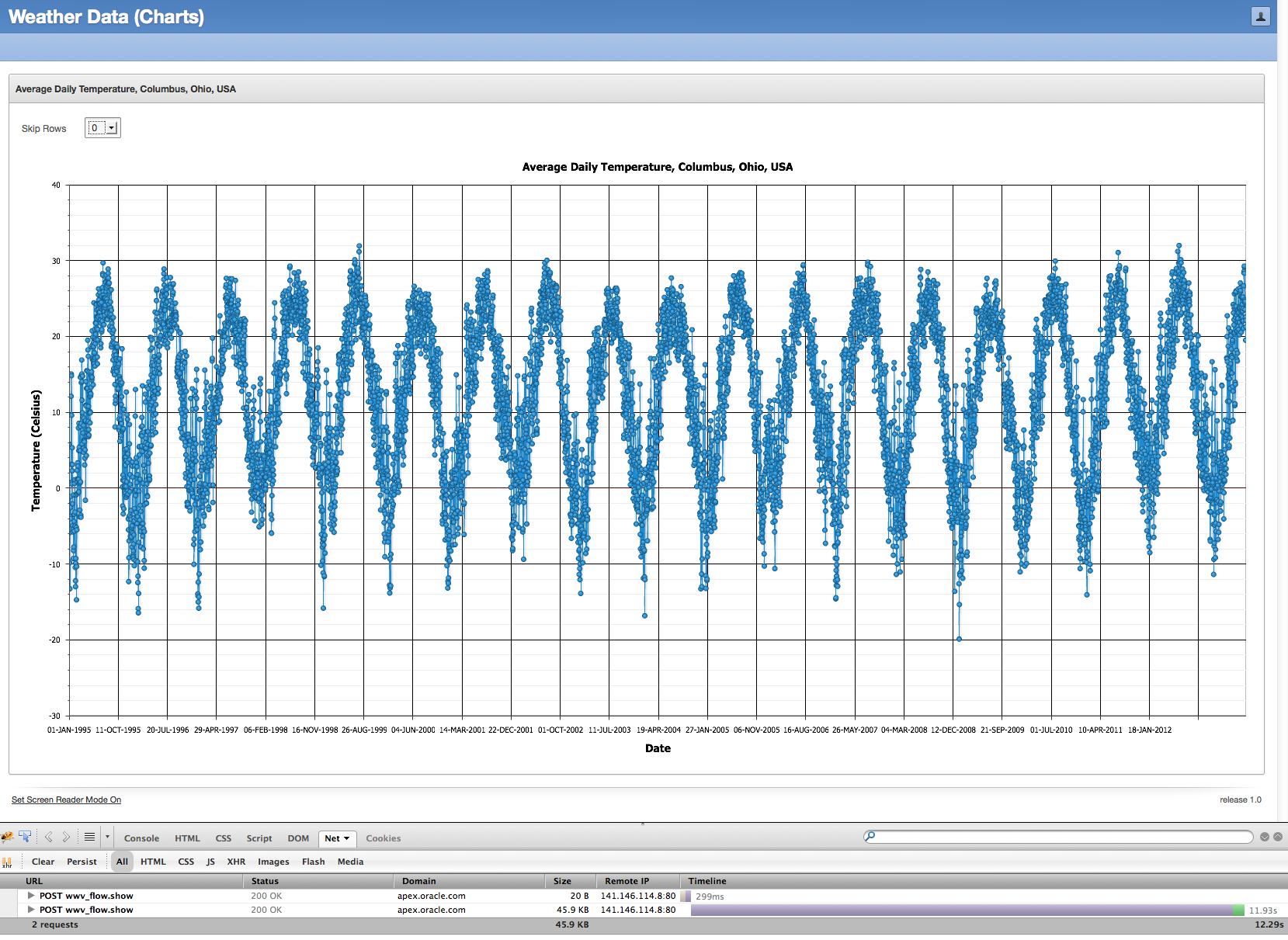
As you can see from the Firebug output, it took a long time to load - 11.93 seconds to load 45.9KB of chart data. And then it probably took another 15 seconds in the browser to parse, digest, and render the corresponding chart.
So how do we improve this situation? It's simple really - just reduce the amount of data. As I told this customer, if he reduced the data points by 50% or even 80%, he would still get a fairly equivalent visualization of the same underlying data, but with less data points and faster loading times by the end users.
To achieve this, we can use the MOD (modulus) function in SQL. The original query I was using in the chart series was:
select null link,
       date_recorded,
       temperature_c,
  from weather_data
 order by date_recorded
To get every other row, I can use the SQL analytic function ROW_NUMBER to get back an ordered set of row numbers, and then use the time-tested trick of the MOD function in the WHERE clause to only include the rows where the result of the modulus function is 0:
with wd as
(select date_recorded,
        temperature_c,
        row_number() over (order by date_recorded) as r
   from weather_data)
select null link,
       date_recorded,
       temperature_c
  from wd
 where mod(r,2) = 0
And now to make this completely variable, I added a select list item to the page and a dynamic action to refresh the chart when the select list item is changed. The final query is:
with wd as
(select date_recorded,
        temperature_c,
        row_number() over (order by date_recorded) as r
   from weather_data)
select null link,
       date_recorded,
       temperature_c
  from wd
 where mod(r,nvl(:P1_SKIP_ROWS,3)) = 0
Running this same sample application but now with a divisor of 10 in the modulus function (hence, returning only 1/10th of the data) will give us a chart that looks like:
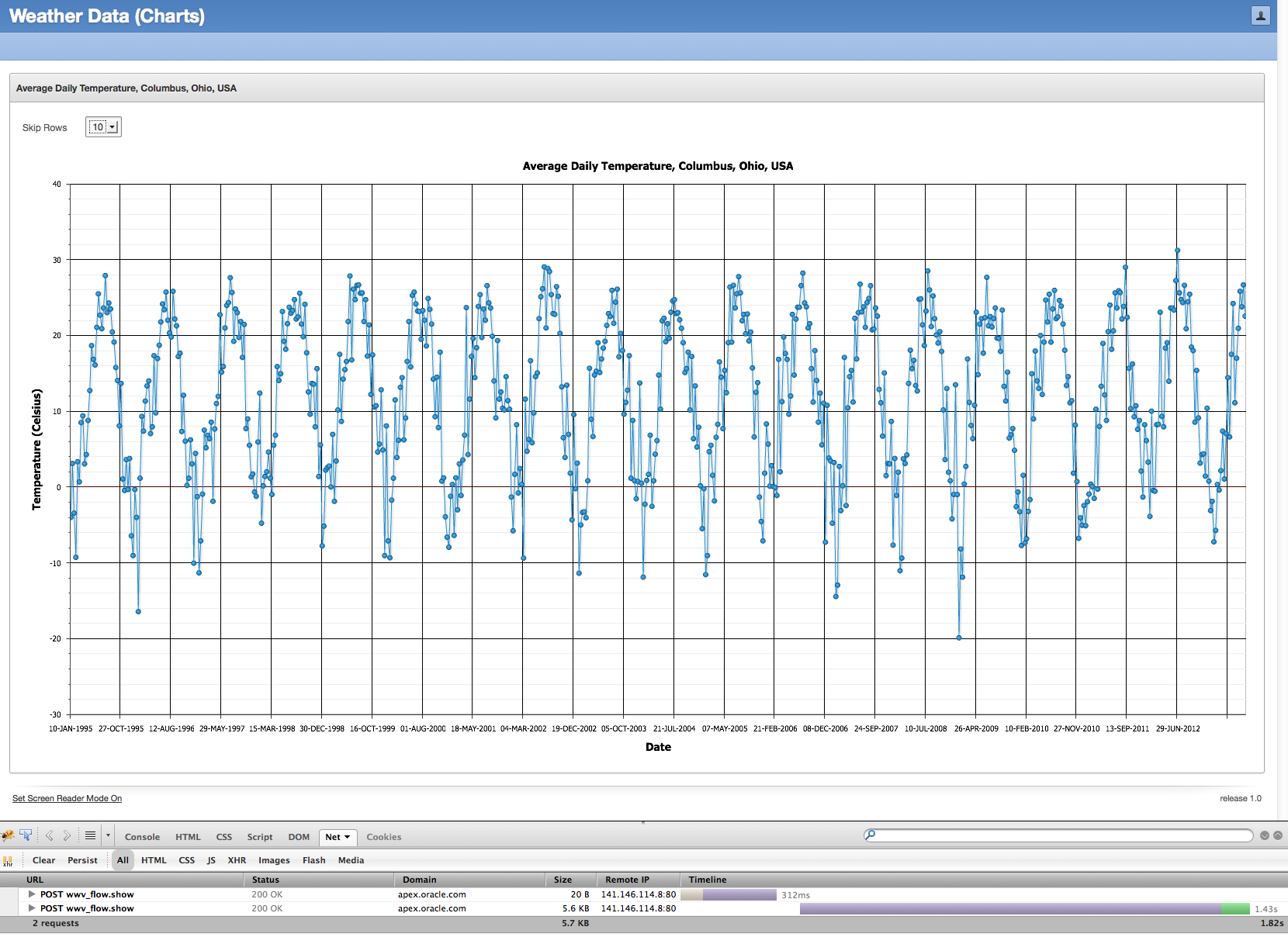
The basic shape of the chart is the same, just less dense and with less data. As Firebug showed, 5.6KB of data came back in 1.43s and it took far less time to render in the browser.
This isn't the solution for all problems. If you need an exact chart, and you're looking for the anomalies in data, then this solution may not work for you. However, in many cases where charts are used in Web applications, the amount of data used to render the charts can be dramatically reduced without any meaningful loss, and only positive results for your end users.
Feel free to try this yourself in this sample application.
Friday, June 07, 2013
The Winds of Change....for Oracle Application Express 5.0
A few changes are planned for Oracle Application Express 5.0.
Beginning with Oracle Application Express 5.0, the minimum database version for Oracle Application Express will be Oracle Database 11.1.0.7. Extended Support for Oracle Database 11.1.0.7 ends in August 2015, per the Lifetime Support Policy, and while only roughly 10% of our APEX customers are still using Oracle Database 11.1, this is still considered a supported product for those customers on Extended Support.
Also beginning with Oracle Application Express 5.0, running APEX-built applications using Internet Explorer 6 will no longer be supported. This was primarily precipitated by the inclusion of jQuery UI 1.10.3 in Oracle Application Express 5.0, but quite honestly, the rest of the world is moving on, and so must Oracle Application Express.
We are also considering dropping support for Internet Explorer 7 to develop applications in the Application Builder, but this is still being evaluated and no final determination has been made. Feel free to sound off if you believe this would cause you or your customers any significant pain.
Beginning with Oracle Application Express 5.0, the minimum database version for Oracle Application Express will be Oracle Database 11.1.0.7. Extended Support for Oracle Database 11.1.0.7 ends in August 2015, per the Lifetime Support Policy, and while only roughly 10% of our APEX customers are still using Oracle Database 11.1, this is still considered a supported product for those customers on Extended Support.
Also beginning with Oracle Application Express 5.0, running APEX-built applications using Internet Explorer 6 will no longer be supported. This was primarily precipitated by the inclusion of jQuery UI 1.10.3 in Oracle Application Express 5.0, but quite honestly, the rest of the world is moving on, and so must Oracle Application Express.
We are also considering dropping support for Internet Explorer 7 to develop applications in the Application Builder, but this is still being evaluated and no final determination has been made. Feel free to sound off if you believe this would cause you or your customers any significant pain.
Friday, May 24, 2013
Image Prefix changes in Oracle Application Express 4.2.2
Most often, patch sets for Oracle Application Express are used to correct defects (i.e., fix bugs) identified in a release. It's rare for features to be introduced or behavior to change. But in the case of Oracle Application Express 4.2.2 and later, there is a change in behavior that is worth discussing, namely, the change in behavior to the Image Prefix application attribute. This has been raised by Oracle Support three times in the past couple weeks, so we have certainly created some confusion amongst our customers.
In a Nutshell
Background
Every instance of Oracle Application Express has an instance-wide image prefix. This image prefix is used by Oracle Application Express to specify the directory location of the Application Express images directory. This image prefix ultimately correlates to a virtual directory or equivalent on the Web server, and this virtual directory directly maps to the 'images' directory shipped with an APEX distribution and staged on the Web server. This image prefix is specified at APEX installation time, but it can be adjusted later if necessary. This image prefix is usually always /i/.
For example, if you go to the Login page of apex.oracle.com and look at the source of that page, you'll see numerous references to images and files of the form /i/... The HTML for the logo in the upper left is:
There is a virtual directory on the Web server of apex.oracle.com, which maps /i/ to a virtual directory. This virtual directory maps to a physical directory on the Web server, which contains the entire 'apex/images' directory from the APEX distribution.
The 'apex/images' directory changes from release to release. The 'apex/images' directory from an APEX 4.1 release is only usable with APEX 4.1. The 'apex/images' directory fron an APEX 4.2 release is only usable with APEX 4.2. You can try and use it with APEX 4.1, but you'll definitely see odd results, if anything at all.
The image prefix is also an attribute of the user interface of an application. This image prefix is used during the runtime of the APEX application, and is used to determine the image prefix for that application. 99% of the time, this image prefix application attribute equals the instance-wide image prefix (typically, /i/), but it could be different too. It could even be wrong! If you change your image prefix attribute to '/foobar/' and then run your application, you'll see that all the references to images and static files in the HTML source of your application all reference '/foobar/'. I suspect you'd get a page with broken images and references everywhere, and in the worst case, you may get what appears to be a blank page.
Using the Image Prefix
Now here's where it gets interesting. Even though the documentation recommends an image prefix of /i/, it isn't absolutely mandatory. So let's say that for my APEX 4.1 instance, I use an image prefix of /i_old/, and for my APEX 4.2.2 instance, I use an image prefix of /i_new/. And also let's assume that these instances use totally distinct Web servers. If I export an application from my APEX 4.1 instance and import it into my APEX 4.2.2 instance, I will need to update the image prefix application attribute before I can run it in the APEX 4.2.2 instance. Why is that? Because my application image prefix is /i_old/, and that isn't defined on the Web server for my APEX 4.2.2 instance.
For those who have participated in the Application Express Early Adopter program before, you'll remember that the image prefix was /i_ea/ or something like that. When you imported your existing APEX application into the Early Adopter instance, you had to adjust the image prefix of your application to be equal to the instance-wide image prefix, /i_ea/.
For enterprises which host multiple APEX instances via one Web server, they have an equally difficult problem. They may have image prefixes of /i40/, /i41/, /i42, and wish to freely move and test applications without having to adjust the image prefix attribute every time they import an application. It's cumbersome and unnecessary.
What has changed in APEX 4.2.2 and Later
Upon upgrade to Application Express 4.2.2 or application of the 4.2.2 patch set, the image prefix attribute of applications will be set to null if their value is equal to the instance-wide image prefix. In the simplest example, if the instance-wide image prefix is /i/ and your application's image prefix attribute is /i/, the application attribute will be set to null in 4.2.2.
If you try to edit the image prefix application attribute and set it to the instance-wide image prefix (e.g., /i/), it won't be saved and it will be null. Only if you change it to something other than the instance-wide image prefix will a non-null value be saved.
The utility script to adjust the image prefix instance-wide setting, apex/utilities/reset_image_prefix.sql, now only adjusts the instance setting and nothing more. No image prefix application attributes are touched. It's unnecessary, because a null image prefix application attribute means "use the setting of the APEX instance".
Now, if you use a non-standard image prefix for your APEX instance, you can import your application into any other instance without having to be aware of what the image prefix is on the target instance.
Now with that said.....I wish you a nice Memorial Day.
In a Nutshell
- In Application Express 4.2.2, if your image prefix application attribute equals the instance-wide image prefix attribute, it will be set to null in your application.
- At runtime, if the image prefix application attribute is null, the APEX engine will use the instance-wide image prefix attribute as your application's image prefix.
- This was done to facilitate ease of movement of applications across varying instances.
Background
Every instance of Oracle Application Express has an instance-wide image prefix. This image prefix is used by Oracle Application Express to specify the directory location of the Application Express images directory. This image prefix ultimately correlates to a virtual directory or equivalent on the Web server, and this virtual directory directly maps to the 'images' directory shipped with an APEX distribution and staged on the Web server. This image prefix is specified at APEX installation time, but it can be adjusted later if necessary. This image prefix is usually always /i/.
For example, if you go to the Login page of apex.oracle.com and look at the source of that page, you'll see numerous references to images and files of the form /i/... The HTML for the logo in the upper left is:
<img alt="Application Express" height="20" src="/i/apex_ui/apexlogo.png" width="280" />
There is a virtual directory on the Web server of apex.oracle.com, which maps /i/ to a virtual directory. This virtual directory maps to a physical directory on the Web server, which contains the entire 'apex/images' directory from the APEX distribution.
The 'apex/images' directory changes from release to release. The 'apex/images' directory from an APEX 4.1 release is only usable with APEX 4.1. The 'apex/images' directory fron an APEX 4.2 release is only usable with APEX 4.2. You can try and use it with APEX 4.1, but you'll definitely see odd results, if anything at all.
The image prefix is also an attribute of the user interface of an application. This image prefix is used during the runtime of the APEX application, and is used to determine the image prefix for that application. 99% of the time, this image prefix application attribute equals the instance-wide image prefix (typically, /i/), but it could be different too. It could even be wrong! If you change your image prefix attribute to '/foobar/' and then run your application, you'll see that all the references to images and static files in the HTML source of your application all reference '/foobar/'. I suspect you'd get a page with broken images and references everywhere, and in the worst case, you may get what appears to be a blank page.
Using the Image Prefix
Now here's where it gets interesting. Even though the documentation recommends an image prefix of /i/, it isn't absolutely mandatory. So let's say that for my APEX 4.1 instance, I use an image prefix of /i_old/, and for my APEX 4.2.2 instance, I use an image prefix of /i_new/. And also let's assume that these instances use totally distinct Web servers. If I export an application from my APEX 4.1 instance and import it into my APEX 4.2.2 instance, I will need to update the image prefix application attribute before I can run it in the APEX 4.2.2 instance. Why is that? Because my application image prefix is /i_old/, and that isn't defined on the Web server for my APEX 4.2.2 instance.
For those who have participated in the Application Express Early Adopter program before, you'll remember that the image prefix was /i_ea/ or something like that. When you imported your existing APEX application into the Early Adopter instance, you had to adjust the image prefix of your application to be equal to the instance-wide image prefix, /i_ea/.
For enterprises which host multiple APEX instances via one Web server, they have an equally difficult problem. They may have image prefixes of /i40/, /i41/, /i42, and wish to freely move and test applications without having to adjust the image prefix attribute every time they import an application. It's cumbersome and unnecessary.
What has changed in APEX 4.2.2 and Later
Upon upgrade to Application Express 4.2.2 or application of the 4.2.2 patch set, the image prefix attribute of applications will be set to null if their value is equal to the instance-wide image prefix. In the simplest example, if the instance-wide image prefix is /i/ and your application's image prefix attribute is /i/, the application attribute will be set to null in 4.2.2.
If you try to edit the image prefix application attribute and set it to the instance-wide image prefix (e.g., /i/), it won't be saved and it will be null. Only if you change it to something other than the instance-wide image prefix will a non-null value be saved.
The utility script to adjust the image prefix instance-wide setting, apex/utilities/reset_image_prefix.sql, now only adjusts the instance setting and nothing more. No image prefix application attributes are touched. It's unnecessary, because a null image prefix application attribute means "use the setting of the APEX instance".
Now, if you use a non-standard image prefix for your APEX instance, you can import your application into any other instance without having to be aware of what the image prefix is on the target instance.
Now with that said.....I wish you a nice Memorial Day.
Friday, April 26, 2013
Oracle Application Express 4.2.2 now available
Oracle Application Express 4.2.2 is now released and available for download. If you wish to download the full release of Oracle Application Express 4.2.2, you can get it from the Downloads page on OTN. If you have Application Express 4.2 or 4.2.1 already installed, then you need to download the APEX 4.2.2 patch set from My Oracle Support. Look up patch number 16277995.
As is stated in the patch set note that accompanies the Oracle Application Express 4.2.2 patch set:
- If you have Oracle Application Express release 4.2 or 4.2.1 installed, download the Oracle Application Express 4.2.2 patch set from My Oracle Support and apply it. Remember - patch number 16277995.
- If you have Oracle Application Express release 4.1.1 or earlier installed (including Oracle HTML DB release 1.5), download and install the entire Oracle Application Express 4.2.2 release from the Oracle Technology Network (OTN).
- If you do not have Oracle Application Express installed, download and install the entire Oracle Application Express 4.2.2 release from the Oracle Technology Network (OTN).
As usual, there are a large number of issues corrected in the Application Express 4.2.2 patch set. You can see the full list in the patch set note.
Like all patch sets for Oracle Application Express, there are a large number of functional issues corrected in this release. But also with the APEX 4.2.2 patch set are a large number of updates to the packaged applications - improved user interface, improved layout and functionality, improved accessibility, improved security, and a fair number of functional bugs corrected. Also in APEX 4.2.2 is a new often-requested application called Survey Builder. This application was architected by John Snyders, who did a masterful job in its creation. I truly think Survey Builder has the potential to be a "killer" APEX application.
Tuesday, April 09, 2013
Great Lakes Oracle Conference - May 14/15, 2013
The Great Lakes Oracle Conference will be held on May 14/15, 2013 at the Cleveland State University campus. Registration includes two full days of training with more than 30 sessions to choose from, vendor exhibits to peruse, lunches, and a networking reception. And if that weren't enough, there will be keynote presentations from Chris Date and Tom Kyte.
There are actually three pre-conference workshops (at additional nominal cost) on three totally distinct topics - All About Binding from Tom Kyte, Oracle Performance Research Seminar from Craig Shallahamer, and Oracle Application Express - I Never Knew It Was So Easy! from me. If you've wanted to get your feet wet with Oracle Application Express, this may be the workshop for you - completely hands on - building, tuning, debugging and monitoring APEX applications. This is geared toward the beginner/intermediate developer - no knowledge of APEX is assumed.
I reviewed the list of presentations and presenters, and I'm convinced this is one of the highest quality events available in the Midwest (U.S.). The early registration rate for the conference is $250 until April 12.
There are actually three pre-conference workshops (at additional nominal cost) on three totally distinct topics - All About Binding from Tom Kyte, Oracle Performance Research Seminar from Craig Shallahamer, and Oracle Application Express - I Never Knew It Was So Easy! from me. If you've wanted to get your feet wet with Oracle Application Express, this may be the workshop for you - completely hands on - building, tuning, debugging and monitoring APEX applications. This is geared toward the beginner/intermediate developer - no knowledge of APEX is assumed.
I reviewed the list of presentations and presenters, and I'm convinced this is one of the highest quality events available in the Midwest (U.S.). The early registration rate for the conference is $250 until April 12.
Friday, March 08, 2013
Invalid database objects on apex.oracle.com?
Most people are aware of apex.oracle.com, the demonstration instance of Oracle Application Express. It's primarily used for people to "kick the tires" of APEX. Last week alone, there were 810 new workspaces approved on this instance.
Changes are coming to apex.oracle.com - it's going to be consolidated onto other hardware and also Oracle Database Vault will be installed and implemented. Part of the process of installing Oracle Database Vault includes running the script $ORACLE_HOME/rdbms/admin/utlrp.sql. This script will attempt to recompile all invalid objects in the database.
As of today, 08-MAR-2013, there are 62,197 invalid database objects across all of the workspaces on apex.oracle.com - not that bad, considering there are 17,447 APEX workspaces and 17,984 workspace schemas. However, it takes a long time to attempt to recompile 62,197 invalid database objects. And this will only serve to dramatically increase the outage time for this instance.
Thus:
Changes are coming to apex.oracle.com - it's going to be consolidated onto other hardware and also Oracle Database Vault will be installed and implemented. Part of the process of installing Oracle Database Vault includes running the script $ORACLE_HOME/rdbms/admin/utlrp.sql. This script will attempt to recompile all invalid objects in the database.
As of today, 08-MAR-2013, there are 62,197 invalid database objects across all of the workspaces on apex.oracle.com - not that bad, considering there are 17,447 APEX workspaces and 17,984 workspace schemas. However, it takes a long time to attempt to recompile 62,197 invalid database objects. And this will only serve to dramatically increase the outage time for this instance.
Thus:
- A listing of all invalid database objects in the workspace schemas was computed today, 08-MAR-2013.
- A second listing of all invalid database objects in the workspace schemas will be computed again on 13-MAR-2013.
- All invalid objects contained in both reports will be immediately dropped with no chance of recovery (as the Recycle Bin will be purged).
Update March 12, 2013: This drop and purge will no longer occur on 13-MAR-2013, nor at any time in the future. We were able to make significant progress in the reduction in the number of invalid objects (reduced by 85%). Thus, we're going to live with the additional outage time cause by this recompilation instead of dropping objects in workspace schemas.
Wednesday, January 23, 2013
Dude, Where Are My Buttons?
An interesting bug was reported the other day on the Oracle Technology Network discussion forum for Oracle Application Express. The scenario is as follows:
1) Download and install Oracle Application Express 4.2.1 anew.
2) Install a translated version of Oracle Application Express
3) Login to a workspace and navigate to SQL Workshop.
What should look like:

is actually displayed as:

Unfortunately, the buttons of SQL Workshop are not displayed when you install a translated version of Oracle Application Express 4.2.1. [If you had Oracle Application Express 4.2 installed and downloaded/installed the Oracle Application Express 4.2.1 patch set from My Oracle Support, you would not encounter this issue.]
This problem can be remedied by downloading the patch set exception for Bug 16191354 from My Oracle Support and applying it to your APEX 4.2.1 instance.
Note - if you choose to install additional translated versions, it's safe to re-run the patch 16191354 after you've installed all translations.
Update: As of January 29, 2013, the APEX 4.2.1 download was updated to correct this problem. So if you download the apex_4.2.1.zip file (full distribution) after January 29, 2013, you should not encounter this problem and you can safely ignore this blog post.
1) Download and install Oracle Application Express 4.2.1 anew.
2) Install a translated version of Oracle Application Express
3) Login to a workspace and navigate to SQL Workshop.
What should look like:

is actually displayed as:
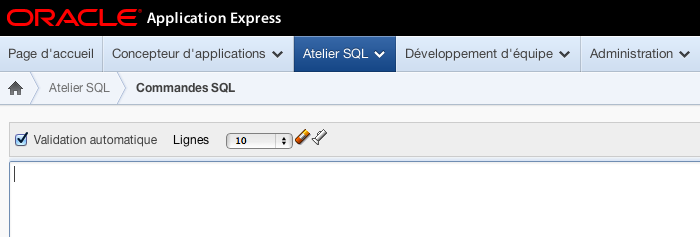
Unfortunately, the buttons of SQL Workshop are not displayed when you install a translated version of Oracle Application Express 4.2.1. [If you had Oracle Application Express 4.2 installed and downloaded/installed the Oracle Application Express 4.2.1 patch set from My Oracle Support, you would not encounter this issue.]
This problem can be remedied by downloading the patch set exception for Bug 16191354 from My Oracle Support and applying it to your APEX 4.2.1 instance.
Note - if you choose to install additional translated versions, it's safe to re-run the patch 16191354 after you've installed all translations.
Update: As of January 29, 2013, the APEX 4.2.1 download was updated to correct this problem. So if you download the apex_4.2.1.zip file (full distribution) after January 29, 2013, you should not encounter this problem and you can safely ignore this blog post.
Friday, December 14, 2012
Oracle Application Express 4.2.1 now available
Oracle Application Express 4.2.1 is now released and available for download. If you wish to download the full release of Oracle Application Express 4.2.1, you can get it from the Downloads page on OTN. If you have Application Express 4.2 already installed, then you need to download the APEX 4.2.1 patch set from My Oracle Support. Look up patch number 14732511.
As is stated in the patch set note that accompanies the Oracle Application Express 4.2.1 patch set:
- If you have Oracle Application Express release 4.2 installed, download the Oracle Application Express 4.2.1 patch set from My Oracle Support and apply it. Remember - patch number 14732511.
- If you have Oracle Application Express release 4.1.1 or earlier installed (including Oracle HTML DB release 1.5), download and install the entire Oracle Application Express 4.2.1 release from the Oracle Technology Network (OTN).
- If you do not have Oracle Application Express installed, download and install the entire Oracle Application Express 4.2.1 release from the Oracle Technology Network (OTN).
As usual, there are a large number of issues corrected in the Application Express 4.2.1 patch set. You can see the full list in the patch set note.
P.S. Don't be alarmed when the patch set note refers to file p14732511_421_GENERIC.zip and the file you actually download from My Oracle Support is p14732511_420_Generic.zip. These are the same file and this version number will be corrected over the weekend.
Monday, November 05, 2012
APEX 4.2 and Textareas
There is a change in behavior in Oracle Application Express 4.2.0.00.27 that I thought was worth making special mention of.
Most page items have a property named "Maximum Width". The purpose of this attribute, as the item-level help states, is to "specify the maximum number of character users are allowed to type into this form element." Thus, if you were to specify a value of 255, then end users theoretically would not be able to enter more than 255 characters for the item value.
Prior to Oracle Application Express 4.2.0.00.27, this attribute for Maximum Width was not emitted in the HTML for Textarea page items. You could have had a Maximum Width of 255 or 4000 or 32000 - it didn't matter. The amount of text that could be entered by your users was essentially unconstrained (up to the 32,000 limit that can be POSTed). In Oracle Application Express 4.2.0.00.27, Textarea page items are now properly including this attribute in the HTML for the page item.
Prior to APEX 4.2.0.00.27, my Textarea named P2_RESUME, with a Maximum Width of 2000, might be rendered like this:
But in APEX 4.2.0.00.27, my Textarea named P2_RESUME, with a Maximum Width of 2000, will now render like this:
A number of internal and external customers have rightfully complained about Oracle Application Express 4.2.0.00.27 breaking functionality in their existing applications. Previously, end users were able to enter a large amount of text in textareas, but now "APEX limits what can be entered by end users." And this directly relates to the Maximum Width attribute, which most developers were able to safely ignore for textareas in the past, but in 4.2.0.00.27, it is very relevant.
I can offer the following suggestions and direction:
1) If you wish to query the APEX data dictionary for all items in your application(s) which may be impacted by this change, you can issue the query:
2) In the forthcoming Oracle Application Express 4.2.1 patch set, this Maximum Width property of textarea items will only be emitted when the application-level attribute Compatibility Mode is 4.2 or later. Thus, if you are upgrading from Oracle Application Express 4.1.1 or earlier, the Compatibility Mode will not be set to 4.2 and your application behavior will remain the same.
3) There is a patch set exception on My Oracle Support, Patch ID 15829665, which implements the above-mentioned "Compatibility Mode" behavior. You can download this PSE (i.e., "one-off patch") and apply it to Oracle Application Express 4.2.0.00.27 today.
Note that this "maxlength" attribute for textareas is not enforced by Internet Explorer.
Most page items have a property named "Maximum Width". The purpose of this attribute, as the item-level help states, is to "specify the maximum number of character users are allowed to type into this form element." Thus, if you were to specify a value of 255, then end users theoretically would not be able to enter more than 255 characters for the item value.
Prior to Oracle Application Express 4.2.0.00.27, this attribute for Maximum Width was not emitted in the HTML for Textarea page items. You could have had a Maximum Width of 255 or 4000 or 32000 - it didn't matter. The amount of text that could be entered by your users was essentially unconstrained (up to the 32,000 limit that can be POSTed). In Oracle Application Express 4.2.0.00.27, Textarea page items are now properly including this attribute in the HTML for the page item.
Prior to APEX 4.2.0.00.27, my Textarea named P2_RESUME, with a Maximum Width of 2000, might be rendered like this:
But in APEX 4.2.0.00.27, my Textarea named P2_RESUME, with a Maximum Width of 2000, will now render like this:
A number of internal and external customers have rightfully complained about Oracle Application Express 4.2.0.00.27 breaking functionality in their existing applications. Previously, end users were able to enter a large amount of text in textareas, but now "APEX limits what can be entered by end users." And this directly relates to the Maximum Width attribute, which most developers were able to safely ignore for textareas in the past, but in 4.2.0.00.27, it is very relevant.
I can offer the following suggestions and direction:
1) If you wish to query the APEX data dictionary for all items in your application(s) which may be impacted by this change, you can issue the query:
select application_id, page_id, page_name, item_name, item_element_max_length
  from apex_application_page_items
 where display_as_code = 'NATIVE_TEXTAREA'
 order by 1,2,3,4
2) In the forthcoming Oracle Application Express 4.2.1 patch set, this Maximum Width property of textarea items will only be emitted when the application-level attribute Compatibility Mode is 4.2 or later. Thus, if you are upgrading from Oracle Application Express 4.1.1 or earlier, the Compatibility Mode will not be set to 4.2 and your application behavior will remain the same.
3) There is a patch set exception on My Oracle Support, Patch ID 15829665, which implements the above-mentioned "Compatibility Mode" behavior. You can download this PSE (i.e., "one-off patch") and apply it to Oracle Application Express 4.2.0.00.27 today.
Note that this "maxlength" attribute for textareas is not enforced by Internet Explorer.
Subscribe to:
Posts (Atom)